CS 106/61A Notes
Lecture notes
Here I will ramble about my brief course in introductory CS :)
Week 1
Broad Basics of Computer Science:
A computer program is a collection of code for the computer to run. The code in a program is divided into smaller, logical units of code called functions, much as all the words that make up an essay are divided into logical paragraphs.
Python Syntax:
In python functions are made by writing def function_name (parameter1, parameter2,… parameter n). The function is called by writing function_name(parameters).
This executes the function with the given parameters and outputs a specific value of some sort The potential values could be an array, number, a true/false value, or it could return a string or function.
Often times there are libraries of functions which are given to programmers to use, so it becomes very important that the functions output and parameters are well understood.
There are certain built-in functions/operations like pow, +, -, //, *, **, sort, sum, %, etc. which can be interpreted as part of pythons included library of functions
There will be syntax errors–they are inevitable–so you need to know what to do about the errors Best option is to read the error message. Sometimes the message will hint at the source of the error which will save a bunch of time.
Loops and Logic Operations:
Loops essentially iterate a specific line of actions based on certain logic operations. Example:
# you can add code with backticks
for i in range(10):
    print(i**2)
There may be loops nested in other loops which iterate a separate action within each larger iteration of a function depending on another logic operation. Example:
for i in range(10):
    for j in range(10):
        print(i * j, end="\t")
    print()
"""
prints a multiplication table up to 10x10
"""
I have only listed for loops, but there are other loops such as while loops which perform similar functions but carry a different syntax and have varied uses.
While loops evaluate the expression that follows them and runs the body if the test is true/otherwise the code runs the code that follows the while loop.
Logic operations such as ==, !=, <=, <, >=, >, etc. all evaluate the true/false value of a comparison then perform an action based on the result of the comparison.
‘None’ represents a null value
Can also make use of ’not’ in logic operations to invert it.
x=21
a=7
while x>7:
    if not x<=a:
        x-=7
"""Yes this code is kinda pointless but it shows how 'not' works"""
Another Example of Logic Operations:
x=0
while x<=10:
    x=x+1
    print(x)
"""
Just writes all the values of x from 1-10
"""
In this case the logic operation was proceeded by a while statement, but it can also be proceeded by if or elif which perform an operation depending on the output of the logic operation.
An “expression” is a piece of code that, when it runs, returns a value to that spot in the code. True/false are referred to as boolean values.
The if statement syntax has four parts — the word “if”, boolean test-expression, colon, indented body lines. The if statement doesn’t continue to run on its own, instead it evaluates the expression once, if it’s true then it evaluates the body of the statement, if it’s false it simply moves on.
Coding Style
This is very basic stuff but will be essential in simplifying and optimizing code.
Indent 4 Spaces: Indent 4 spaces whenever defining a function or writing out the body of a loop.
One Space between items: always space between items except for the space to the left of a comma and in a function name and its parenthesis. No space between parenthesis and their contents.
pass: The word pass in Python means is a placeholder that does nothing. Often pass in the code marks the place where you add code. Remove the pass when you put your code in, it’s just a placeholder.
def - 2 Blank Lines: In code with multiple functions, leave 2 blank lines between defs.
Single quote: Use single quotes when enclosing texts/strings.
Helper Functions: Usually helpers are put first in the program text.
Misc. Keyboard Shortcuts
A few keyboard tricks for editing code. On the Mac, “command” here refers to the “command” key. On windows it’s either the control key or the windows key.
Select multiple lines - tab, shift-tab to indent and un-indent.
Select multiple lines - command-/ (command slash) comments and un-comments lines.
Control-k “kills” a line of text, deleting it. Works in gmail and all web forms and in a lot of editors.
Bigger Picture of Programs and How to Decompose a Program
Broadly, Programs are made up by many functions. So if we want to understand the overall function of a program, what we should do is to break it down into its composite functions. Then we can look at smaller “helper functions” which seem to solve a sub-problem. By understanding the helper functions, we can understand larger functions and mesh it all together to understand the overall program.
Web Browser: Web Browsers are made up of millions of lines of code. It’s an inconceivable amount of code, but if we decompose the browser into smaller helper functions such as, draw_png_image() or check_ssl_keys(), we can get an idea of how the browser executes some of its functions. The idea is that the web browser has been shattered into thousands of smaller functions and the coherence of all the smaller functions is what produces the browser the user sees.
Calling Functions
In Python there are 2 ways of calling functions: call–noun.verb() and call–function_name(parameter).
To define a function we write def function_name or function.name() and we follow this by a colon and indented lines of code which define the operation of the function. We can then define the value that the function returns when it is evaluated by writing return ‘value’.
When a function is called in code, the computer is redirected to read the code within the function before returning to the space after the function call.
Function Pre/Post Conditions:
-Think careful about each function’s boundaries, so that they fit together when called together -Think about pre/post conditions of each function -pre: assumptions–required before it runs -post: results after it runs–promised after it runs -Pre/post make the contract of function - i.e. what lines in the function get to assume and what to expect after it runs
Week 2
Variables
When setting a variable, all that is needed is to simply state the name of the variable, follow it by an equal sign, then add a value that the variable is equal to. On later lines when this variable is called, the program will retrieve the stored value of the variable. Variables in CS are different since once declared, they can be set to different values and when retrieved/called later in the code, the value retrieved will be the most recently declared value of the variable. In other words, it is not like math where the equal sign sets up a permanent equality.
Digital Images
Images are broken down into pixels. These pixels store the information for a single color. This data can be stored in a number of ways, but for now we will focus on RGB. RGB values are stored as the set of 3 values (red, green, blue) with ranges for these values from 0 to 255. Pixels are arranged in an x,y coordinate system with origin at the top left and positive y in the downwards direction and positive x in the rightwards direction. We can edit an image by uploading it into python, then creating a variable for pixel which refers to one pixel inside an image. We can edit the RGB values of this pixel by using pixel.color=value(from 0-255)
For Loop
This is probably the single most useful loop. The for loop executes an action or collection of lines FOR each value in some collection. In other words it iterates a function n times, where n is the number of items in a collection.
Syntax:
for var in collection:
    #use variable here(do something for each iteration)
    return value
The value will be returned as the output of the function. Often times we will use range(set) instead of collection. Note: in python and all code for that matter, indexing begins at index 0. Therefore we must consider this when discussing the range of a set. I.e. range(10) -> [0, 1, 2, 3, 4, 5, 6, 7, 8, 9]. If we want to update the value of a variable in a loop it is common practice to use shorthand forms of certain operations. I.e. x = x + 1 –> x += 1; x = x - 1 –> x-= 1; x = x * 1 –> x *= 1.
Example:
def red_channel(filename):
    image = SimpleImage(filename)
    for pixel in image:
        pixel.green = 0
        pixel.blue = 0
    return image
Nested for loops: when we have two for loops, we iterate through the entire inner loop for each iteration of the outer loop.
Example related to images:
def darker(filename):
    image = SimpleImage(filename)
    for y in range(image.height):
        for x in range(image.width):
            pixel = image.get_pixel(x, y)
            pixel.red *= 0.5
            pixel.green *= 0.5
            pixel.blue *= 0.5
    return image
def aqua_stripe(filename):
    image = SimpleImage(filename)
    out = SimpleImage.blank(image.width+10, image.height)
    for y in range(image.height):
        for x in range(10):
            out_pixel = out.get_pixel(x, y)
            out_pixel.red = 0
    for y in range(image.height):
        for x in range(image.width):
            pixel = image.get_pixel(x, y)
            out_pixel = out.get_pixel(x+10, y)
            out_pixel.red = pixel.red
            out_pixel.green = pixel.green
            out_pixel.blue = pixel.blue
    return out
"""Takes an image, makes a separate image 10 pixels wider with an aqua stripe on the left 10 pixels of width of the image.
Does this by looping through the first width of pixel"""
def mirror2(filename):
    image = SimpleImage(filename)
    out = SimpleImage.blank(image.width * 2, image.height)
    for y in range(image.height):
        for x in range(image.width):
            pixel = image.get_pixel(x, y)
            # left copy
            pixel_left = out.get_pixel(x, y)
            pixel_left.red = pixel.red
            pixel_left.green = pixel.green
            pixel_left.blue = pixel.blue
            # right copy
            # this is the key spot
            # have: pixel at x,y in image
            # want: pixel_right at ??? to write to
    for y in range(image.height):
        for x in range(image.width):
            pixel = image.get_pixel(image.width-1-x, y)
            pixel_left = out.get_pixel(image.width+x, y)
            pixel_left.red = pixel.red
            pixel_left.green = pixel.green
            pixel_left.blue = pixel.blue
    return out
"""Creates a mirror image by copying the original then setting the coordinates of the copy pixel equal to the mirror
coordinate by taking the width-1(accounting for zero-based indexing) and subtracting the x coordinate"""
Note that both 1 and 2 use helper functions which I have not defined here
(i.e. image.get_pixel(x, y), SimpleImage.blank)
Math systems: In python there are two math systems: int and float. Int includes…well…integers. Wow, shocker. Float includes numbers that are not whole numbers(or they are and they just are followed by a .0. Both int and float support the usual operators: +, -, *, /. These languages follow pemdas, after accounting for pemdas the evaluation goes from left to right. Int-inputs lead to int-outputs(excpet/below). Presence of a float value makes the whole expression float. Python int values do not have a fixed “max”-unusual since must languages do. Float is not actually precise. Even if the answer evaluates to a whole number, a float input forces the result to be float. Must pay attention to float vs int because when these numbers are used as parameters, their type may cause a function to fail.
We can convert between int and float values by writing int(value) which will round down to the integer value of the input. float(value) will simply attach a dot and zero to the end.
Division: / is unique. a / b returns a float value no matter the input. // will round down(essentially int(a/b))
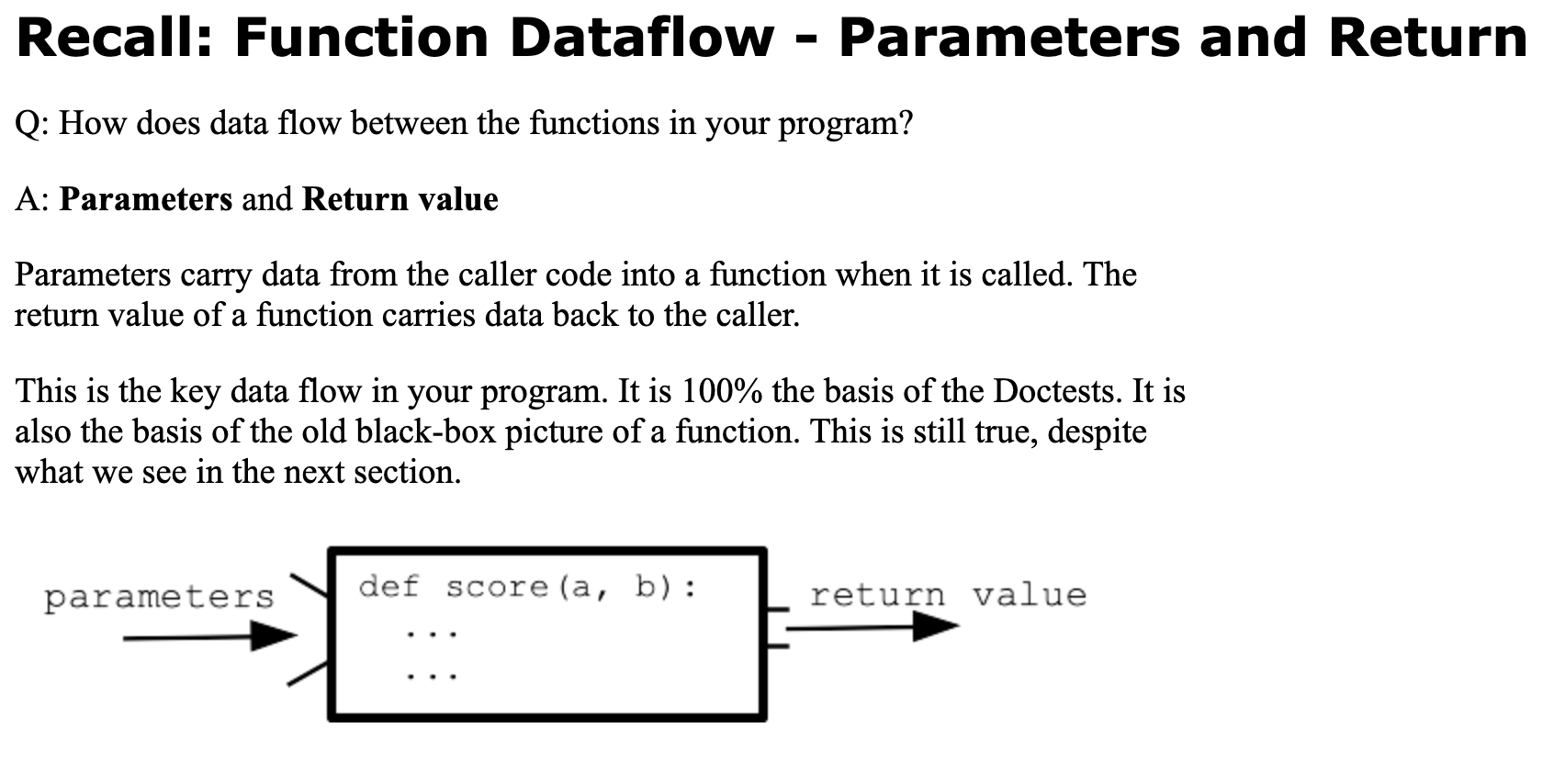
How do parameters work: The parenthesis part of the function call contains the parameter values for the function, also known as the arguments of the functions. When a function is called it essentially takes the argument it is given in the call and uses that value as a stored variable for the body of the function. Functions must be called with the correct number of parameters– sometimes functions can be called with a blank() this just runs the function with some default parameters that can be optionally set.
Week 3
Deciphering Functions
One of the best ways to not only develop functions, but also decipher them is to break them down into certain test cases where we fix the inputs and outputs and look at/come up with a way for the computer to get from fixed input to fixed output.
Return value pick-off strategy: One way we can make sure the function is returning the right value for certain test cases is a pick-off strategy in which we have a set number of outcomes and conditions needed to get those outcomes and we simply make an if statement for each condition followed by the appropriate outcome return value. Pick off is like a vertical to-do list of tests, and the code will just go through them order until one is True. The cases form a simple, vertical series to try in that order.
def pick_offs(x): if case1: return answer1
if *case2*:
    return *answer2*

if *case3*:
    return *answer3*

return *nocaseworked*
Boolean Values
Boolean values are simply true false values. If-test and while-test work with boolean inputs. Booleans are produced by ==, !=, <=, >=, <, >
Strings
-Very widely used data type
-e.g. ‘Hello’
-Strings are basically just sequences of characters
-A string in code is called a “literal”
-Python strings are written on one line with single quotes
-Can also use double quotes if you need a '
len() function: -Returns the number of characters in a string
-Empty string is zero chars
-’'
-Valid string with len()=0
-Strings are also zero-based indexed
-String characters/and array values can be accessed by string/array[index]
-Valid from 0 to len-1
-Strings are not editable like other variables
-They are called immutable
-e.g. s=‘python’
–>s[0]=‘P’
-s[0]=‘x’
–>error
-Strings can be combined by the plus operator which simply concatenates the two strings on either side
-uses a new memory to hold the result
-a=‘hello’
-b=‘there’
-a+b
–>‘hello there’
-a
–>‘hello’
A string is made of characters, aka chars. Characters are divided into character classes:
Alpha (alphabetic) - e.g. ‘a’, ‘k’, ‘R’, ‘Z’ .. used to make words
Digits - ‘0’ ‘1’ .. ‘9’ used to make numbers
Space - space ’ ’ , newline ‘\n’ tab ‘\t’, - aka “whitespace”
Newline ‘\n’ is char from the return/enter key on keyboard
The backslash form ‘\XXX` is a way to write special characters, e.g. ‘\n’ is newline
- Misc - ‘$’ ‘%’ ‘;’ … miscellaneous chars not in the first 3 categories
There are noun.verb tests s.isalpha() s.isdigit() s.isspace() returning boolean True or False if a char is in a category
There is not a test for “misc”, which is just a char which is not alpha or digit or space
For empty string these return False (a weird edge case)
–> ‘abc’.isalpha(): True # Works for multiple chars too
–> ‘9’.isdigit(): True
s.upper() - returns uppercase form of s
s.lower() - returns lowercase form of s
Immutable: s.upper() returns a new, converted string–>The original string s is unchanged
s.isupper() - True if made of uppercase chars
s.islower() - True if made of lowercase chars
A char with no upper/lower difference, e.g. ‘@’ or ‘2’
Returned unchanged by upper()/lower()
isupper()/islower() return False
Subtle: an ‘@’ among alpha chars is ignored by .isupper()/.islower()
So how do you change a string variable? Each time we call a function to compute a changed string, use = to change the variable, say s, to point to the new string.
Say we have a string s, and want to change it to be uppercase and have ‘!!!’ at its end. Here is code that works to change s, using the x = change(x) pattern.
Else, Elif, and More If
So far we know that if we use an if statement it will execute a certain number of lines if the test case is valid. We will use the if/else form when we have two actions, and we always want to run one action or the other. The regular if with 1 action is more common.
Example: not the best
if some_test:
pass # do nothing here
else:
do_something()
The correct way to do that is with not:
if not some_test:
do_something()
Grids
-grid = Grid(4, 3) - create, all None initially
-Zero based x,y coordinates for every square in the grid:
-origin at upper left
-x: 0..grid.width - 1
-y: 0..grid.height - 1
-grid.width - access width or height
-grid.get(0, 0) - returns contents at x,y (error if out of bounds)
-grid.set(0, 0, ‘a’) - set at x,y
-grid.in_bounds(2, 2) - returns True if x,y is in bounds
Doctests
Doctests are a way of modeling what the output of the function should be based on certain specific arguments. These are written within the comments “”"__""" section of the code and the actual lines which we want to model are indicated by »> followed below by the output of those lines. Need concrete cases to write Doctest. They can be small! An input grid, and the expected output grid. That’s what makes one test case - an input and expected. We could also call these “before” and “after” pictures.
If the got differs in any little way from the expected, the test fails, e.g. having an extra space, or using " instead of the expected ‘.
Don’t write the expected output like this - will fail
[[“b”, “c”, None], [None, None, None]]
Write it exactly syntactically as the function returns it
[[‘b’, ‘c’, None], [None, None, None]]
To debug, we want output which is: small, frozen, and visible
The Doctest gives us exactly this.
Looking at the failing Doctest, we have the got output the expected and the code - looking at these three is a good step for debugging.
The failing Doctest is like a to-do item — what is the first bit of the got that is wrong? What line produced that?
Note also that the data for the Doctest case is small and made visible by the system. It’s not moving around. We can take our time. Contrast this to watching the animation.
Debugging Techniques
#1-read the error message: An exception in python represents an error during the run that halts the program. Read the exception message and its line number. Then read the text from the bottom up. Look for the first line of code that is your code and read its error message. It’s basically just flagging where you went wrong and you can often figure out whats wrong just by looking at the line again.
#2-look at the output: The code and output aren’t shifting around, they are perfect. You just need to figure out how you messed up when using it. Look at the first part of the output which is wrong–>then figure out what line of the code produced that. You can use doctests for this, since they can show you what you need with one click. Run the doctest and you have the code, the input, and the output all to work with.
How do you debug a function? Run its small, frozen, visible Doctests, look at the output, expected and the code - all of which the Doctest makes visible.
Look at the got output from the failed Doctest
Run program for fun, then run Doctest again for more debugging
Doctest passes .. run the GUI .. now it’s perfect
#3-add print in the code: This is used less often, but it serves as a means to relieve all the mental tracking of code done in your head. Add print in the code to see the state of the variables. Usually we will
Week 4
String in/not in
You can create boolean values by writing if ‘string’ in other string. This will return a boolean value. If it is true, that means the ‘string’ can be found somewhere in this other string. Else, the string cannot be found in the other string. if ‘string’ not in string does the same, however the logic is inverted.
And/Or in conditional statements
The ‘and’ and ‘or’ statements can be used to make a conditional statement more exclusive or less exclusive respectively. ‘and’ will make sure that both the boolean values are true/false before moving to execute the lines of the if statement, ‘or’ will just check if one of the boolean values is true/false before moving to execute the lines of the if statement. I say true/false here because there could be a ‘if not ___:’ statement.
Function Improvement Strategy
Sometimes there may be some operation such as s[i].lower(), that we may not want to repeat if we are writing a lengthy function(convenience). In such a case, we could add a variable such as ’low = s[i].lower()’, which we could use in places where such a thing needs to be evaluated, such as in an if statement. As a general rule, it is best to keep variable names very short–maybe tolerating one _. They cannot, however, be too short or cryptic that the reader won’t be able to understand.
Notes about Elif
Use the if/elif structure to look through a series of tests, stopping at the first True test. The structure is exclusive; it selects one case and skips all the others. This is much more rarely used than the plain if-statement. The structure has n if-tests.
if test1: action1 elif test2: action2 elif test3: action3 else: action4 Python goes through the tests from top to bottom, stopping at the first True test. Python runs the corresponding action, and then exits the if/elif structure. The result is that at most 1 of the n actions runs. An optional “else” at the end runs if none of the tests succeed. A return can accomplish exclusivity similar to the if/elif structure, which is why we have not really needed if/elif up until now.
String Slices
Strings can be sliced and the slices of that string can be fetched by using string[slice_start_index:slice_end_index+1]. Can omit the start index and the slice wills tart from the 0 index. Can also omit the end index and it will slice till the end of the string.
-Optional / advanced shorthand - you never need to use this Handy way to refer to chars near the end of string Negative numbers to refer to chars at end of string
-1 is the last char
-2 is the next to last char
Works in slices etc.
Maybe just memorize this one: s[-1] is the last char in s
Leveraging patterns
Often when you confront a computer problem, you’ve seen something similar before. It’s nice to lean on patterns like this, filling in some remembered structure quickly, and then focussing on what is specific to this problem.
For example wep have already seen this ‘Accumulate pattern’. 1. Before ther start: result=empty. 2. in the loop, some form of: result += xxx. 3. At the end: return result
A common problem in computer code is counting the number of times something happens within a data set. This fits the accumulate pattern, using count = 0 before the loop and count += 1 in the loop. Recall that the line count += 1 will increase the int stored in the variable by 1.
Value types
Python code works on values, and each value has a typer which determines how it behaves. Some types we are already familiar with include: int, str, null, booleans, floats, etc.
Python operators such as + depend on value types being compatible. We can convert values using type conversions:
int(xxx) takes in string (or other) value, converts to int e.g. int(‘123’) -> 123
str(xxx) takes in int (or other) value, converts to str e.g. str(77) -> ‘77’
Works for other types we will see later too: float(), list(), bool() New operators:
The int division operator // rounds down to produce int, so we use this when we need an int. This division and discards any remainder, rounding the result down to the next integer.
Mod operator %: Basically just gives the remainder after int division. (avoid negative numbers or floats). 0=divided evenly. 57 % 10 = 7. mod 0 doesn’t work, obviously. mod 2 can offer if something is even or odd.
File reading and .txt stuff
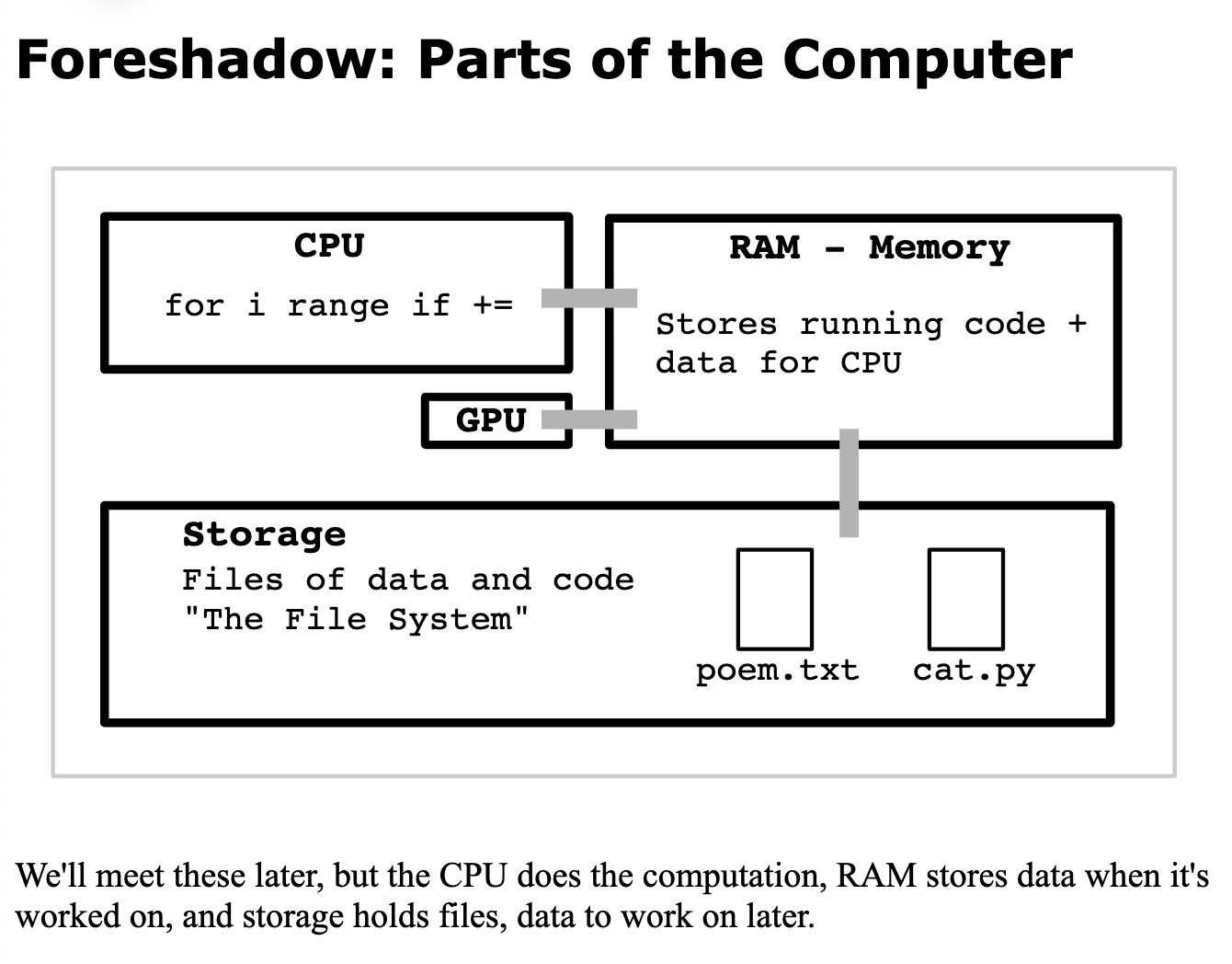
We are basically always going to be running python given some input files. Below is basically just a tutorial for how to work with .txt files in python. It also covers how to work with other files and how the computer runs programs as a whole but the primary focus is .txt.
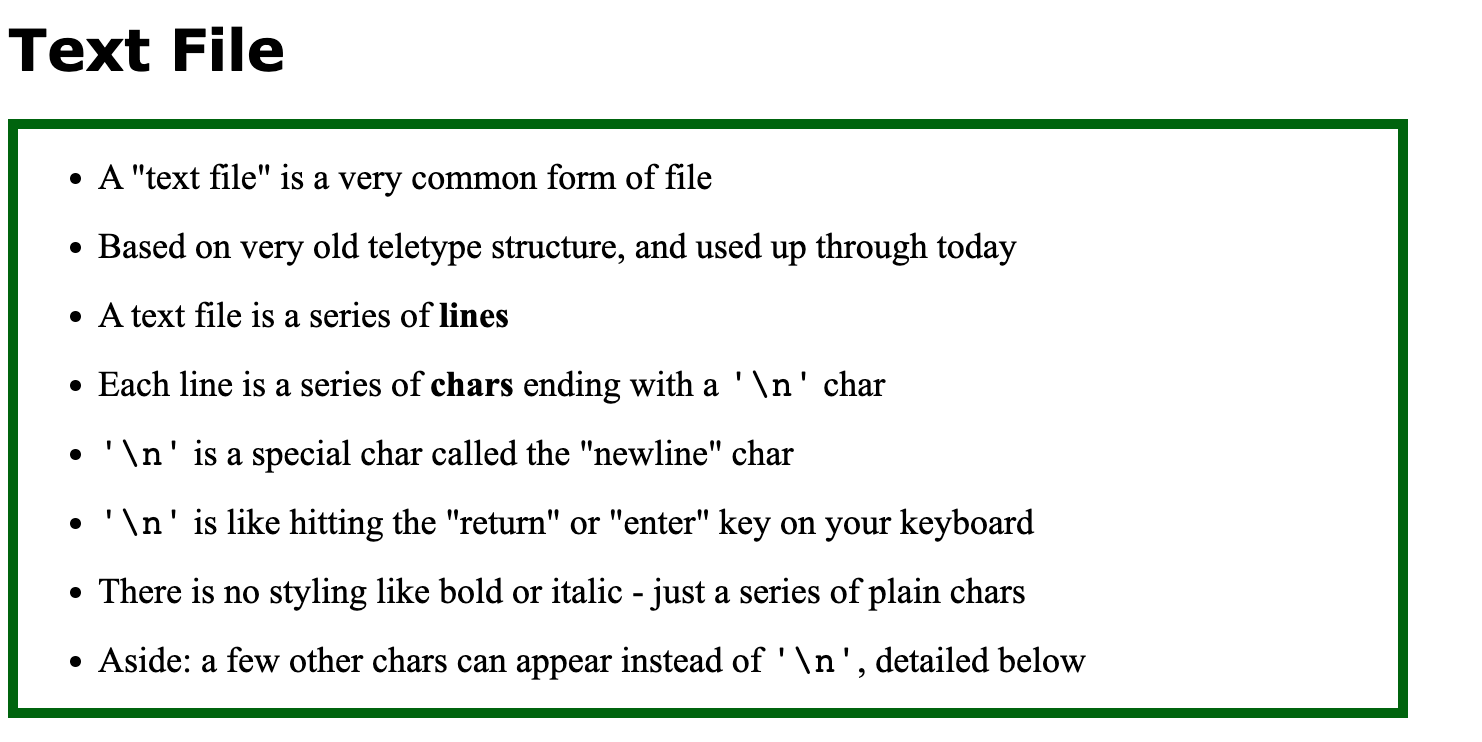
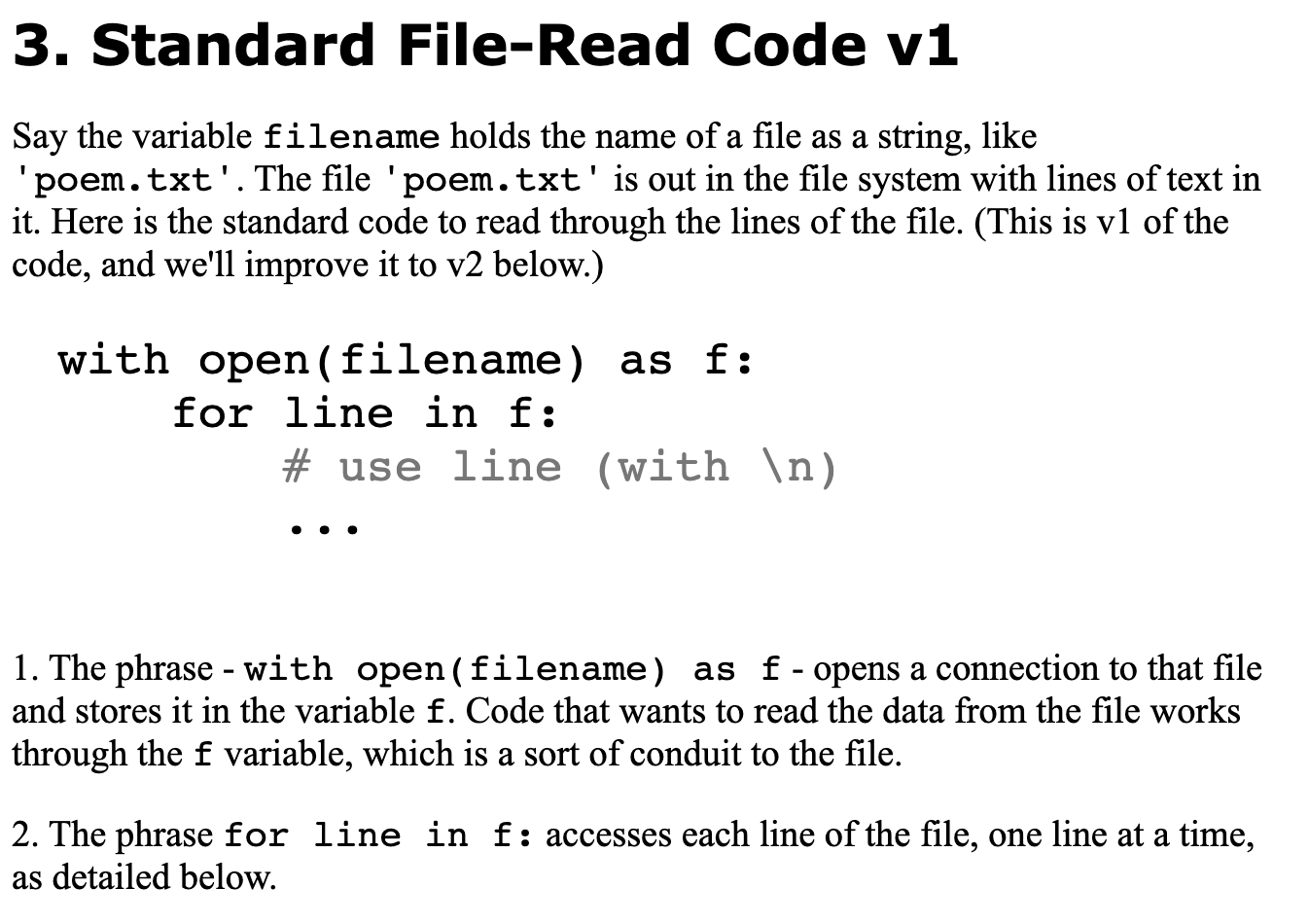
The newline character ‘\n’ at the end of each line can be nuisance. We can remove it with the s.strip() function which returns a version of the string with whitespace chars like space and newline removed from the beginning and end of a string.
More Command Line
We are familiar with working in the command line for writing little phrases and running code, and in python for actually creating code that does something. The connection between these two lies in python under the main() function.
The function main() is typically the first function to run in a python program, and its job is looking at the command line arguments and figuring out how to start up the program.
Command line arguments, or “args”, are extra information typed on the line when a program is run. The system is deceptively simple - the command line arguments are the words typed after the program.py on the command line, separated from each other by spaces.
Under main: CS106A standard line args = sys.argv[1:] which sets up a list named args to contain the command line arg strings.
The code in main() can use a simple series of if-statements to detect the different options, such as -affirm, and run the appropriate code for each option.
For example, consider a run of the program with the -affirm option like this:
$ python3 affirm.py -affirm Lisa Here is the if-statement in main() which detects this command line option and runs the code for it. The code checks if the number of args is 2, and the first arg (i.e. args[0]) is -affirm. If so, it prints the name which is in args[1] with a random affirmation.
def main() args = sys.argv[1:]
# 1. Check for the arg pattern:
#   python3 affirm.py -affirm Bart
#   e.g. args[0] is '-affirm' and args[1] is 'Bart'
if len(args) == 2 and args[0] == '-affirm':
    # Select random nice phrase
    affirmation = random.choice(AFFIRMATIONS)
    # Print with the name in args[1]
    print(affirmation, args[1])
The values in the args list are always strings.\
Foreach loops
foreach loops can loop over some collection of values(could be a string, could be a list, could be a dictionary, etc.) and for each variable of a specified type it finds in the collection it will do something. E.g. for ch in s: –looks at each character in a string ’s’ and does something.
You should use this when you don’t need to work with the index of each item.
Example
def sum_digits2(s):
    sum = 0
    for ch in s:
        if ch.isdigit():
            num = int(ch)  # '7' -> int 7
            sum += num
    return sum
Lists FINALLY
Lists are linear collections of any type of python value, written within square brackets and separated by commas.
Basically they are just vectors that can store more information than just numbers.
The values in a list are called “elements”
To access a value at a particular index of the list just do lst[i]. And yeah the generic name is lst.
Unlike strings, you can change the value of a list at a particular index and it will permanently change.
lst.append(value) adds an element to the end of the list. += does not work and nor does = without an index
Can tell whether a value is in a list(in boolean form) or not in a list(inverted boolean) by using “value in lst”
list.index(target) finds the index of a target
Note that this will produce a runtime error if target is not in the list, so we must combine with: “if value in list:”
A general rule for naming lists is to just write the type of value followed by s. E.g. nums for a list of numbers
Foreach on lists
Can use foreach on lists by using the general form–for var in list:
Do not change the list in the for loop: will obviously cause issues
The loop takes control of the variable–setting it to point to each element in turn, one element per loop
Constants
Some global variables are meant to be unchanged. Basically we want these to only be read by the code not modified.
Python Convention: upper case means its a constant
Week 5
Writing good code
-We need to run the code against a few inputs, checking the output for each case. If the code works against a few cases, suggests it is probably correct. It is not a 100% proof, which is surprisingly difficult or impossible to obtain, but tests are very good in practice.
Code that the computer has never run over likely has bugs in it. This can happen if an if-test is always false in a program.
-Make sure code is clean with good style: just helps reduce bugs in the first place, and it’s easier to add features to code that is already clean.
-If the code works correctly and looks good, we might also want to tune it to run fast or use less memory. For some bits of code, speed is crucial.
Bits
Store 0s and 1s
-Bytes store 8 bits
-n bits can represent 2^n patterns
More of How Computers Actually Work
We discussed CPU, RAM, and Storage briefly. Now we dive further into what these bits of hardware actually do and what some other pieces of hardware do.
-CPU: central processing unit. Does all the work, operations, runs all the lines. CPU’s are divided into cores. Each core can run code in RAM. So a 4-core CPU can run 4 processes simultaneously. Adding cores provides diminishing returns. CPUs can also do what is known as multiprocessing, basically they just rapidly switch between processes to run them simultaneously.
-RAM: Random access memory. Temporary store of bytes for CPU. Stores code and variables of program. Not persistent ie (power off=erased). The area in RAM for each process holds space for the code to run & values for variables. The CPU core runs the code and manipulates the values. The CPU core does not run Python directly. Instead, the CPU core runs a very simple “machine code.” Basically 1 line of python code is expanded to about 10 “machine code” instructions to run on the CPU.
-Storage: persistent storage. Storage in the form of files, folders, measured in bytes.
-GPU: Graphics Processing Unit. Specialized for graphics/pixel processing.
-TPU: Tensor(higher dimensional matrix) Processing Unit. Specialized for AI inference work.
Whenever we run a program, it is known as a process. Each process gets its own area in RAM. Each process in RAM is kept separate from the others. Multiple processes can run at one time. When a process exits, its RAM space is reclaimed. The operating system manages the processes. Specifically, operating systems do the following: start and stop programs, manage memory between processes, manage files.
Week 6
More if/while loops
The for/i/range form is great for going through numbers which you know ahead of time - a common pattern in real programs. If you need to go through 0..n-1 - use for/i/range, that’s exactly what it’s for.
But we also have the while loop. The “for” is suited for the case where you know the numbers ahead of time. The while is more flexible. The while can test on each iteration, stop at the right spot. Ultimately you need both forms, but here we will switch to using while.
Note can do a for i in range n loop with a while loop by just doing: while i < n: then updating i in the while loop.
While loops are more useful when we need fine control of the index.
-New technique: have a var which is essentially a pointer with an index in a string. Then just update the pointer while some condition is being fulfilled by that while loop. Should lead to some desired outcome where that condition isn’t fulfilled.
Here’s an example of the pattern.
def at_word(s):
    at = s.find('@')
    if at == -1:
        return ''

    # Advance end over alpha chars
    end = at + 1
    while end < len(s) and s[end].isalpha():
        end += 1

    word = s[at + 1:end]
    return word
Boolean Expressions
Mixtures of boolean operators brings into play the idea of precedence in CS.
-not has the highest order, followed by and then or.
-We can work around this by setting parenthesis
Style bit
Normally each line of python is unbroken but if you add parenthesis, python allows the code to span multiple lines until it reaches the closing parenthesis.
It’s best to indent the later lines in the unbroken line an extra time
Canvas Drawing :/
YAY MY FAVORITE TOPIC <(‘w’)>. Just kidding. But I have to record my notes for it anyways :(. Python has a built-in graphical interface known as TK. Within TK, we can do things like build drawings, interactive buttons that get the user’s input, etc. For now we will focus on just the canvas aspect of TK. The canvas of TK is basically just a grid with a bunch of rows and columns marked by x, y. To get the top left coordinate, it is just 0, 0. To get the bottom right coordinate, it is just width - 1, height - 1(zero indexing).
There are a few built in functions we can use to create objects on the canvas:L
    def draw_line(x1, y1, x2, y2):
        """
        Draws a black line between points x1,y1 and x2,y2
        Optional color='red' parameter can specify a color.
        """

    def draw_rect(x, y, width, height):
        """
        Draws a 1 pixel rectangle frame with its upper left at x,y
        and covering width, height pixels.
        Takes optional color='red' parameter.
        """

    def fill_rect(x, y, width, height):
        """
        Draws a solid black rectangle with its upper left at x,y
        and covering width, height pixels.
        Takes optional color='red' parameter.
        """

    def draw_oval(x, y, width, height):
        """
        Draws a 1 pixel oval frame with its upper left bounding rect at x,y
        and covering width, height pixels.
        Takes optional color='red' parameter.
        """

    def fill_oval(x, y, width, height):
        """
        Draws a solid black oval with its upper left bounding rect at x,y
        and covering width, height pixels.
        Takes optional color='red' parameter.
        """

    def draw_string(x, y, text):
        """
        Draws a black text string with its upper left at x,y
        Takes optional color='red' parameter.
        """
This is pretty trivial, but here are the formulas that are provided:
-proportionate x = left + fraction * (width - 1)
-x = left + 0.5 * (width - 1) # 50% across
-x = left + 0.75 * (width - 1) # 75% across
-x = left + (3 / 4) * (width - 1) # equiv fraction
-x = left + 1.0 * (width - 1) # 100% across
Say we want to draw n lines going from the top left corner of the shape to points along the right side of the shape:
-Natural to write a for loop, draw a line on each iteration
for i in range(n):
    y_add = (i / (n - 1)) * (height - 1)
    # call draw_line(), y = top + y_add
Another example:
def draw_grid1(width, height, n):
    """
    Creates a canvas.
    Draws a grid1 of n-by-n black rectangles
    (this code is complete)
    """
    canvas = DrawCanvas(width, height, title='Draw1')

    # Figure sizes for all sub rects
    sub_width = width / n
    sub_height = height / n

    # Loop over row/col
    for row in range(n):
        for col in range(n):
            # Figure upper left of this sub rect
            left = col * sub_width
            top = row * sub_height
            canvas.draw_rect(left, top,
                             sub_width, sub_height)
Week 7
Dictionaries!!!
-Python “dict” type, a “dictionary”
-Stores key/value pairs
-Each value is stored under a key
-Dict is a bit advanced, compared to basic string/list
-Defining features of a dict:
Choose a key to file each value under, e.g. Sunet, or transaction date
Get and set each value under its key
The get/set operations are fast
-As we mentioned dictionaries organize data around keys.
-For each key, the dictionary stores one associated value
-Can look up a value by its key
-Not alphabetical: keys are often in a random order
-Define a dictionary with d={}
-Set: d[key] = value
-Set creates that key entry in the dictionary if needed
-Also overwrites any previous value for that key
-Literal dict syntax key:value
{‘a’: ‘alpha’, ‘g’: ‘gamma’, ‘b’: ‘beta’}
-d[key] returns the value for that key
-useful: += –> Does a get/set series on the value. This will be a handy pattern
-e.g. d[‘a’] += ‘!!!’ –> Equivalent to: d[‘a’] = d[‘a’] + ‘!!!’. Adds ‘!!!’ to end of that value
-Main thing to look out for is that d[key] only works if the key is in the dict
-Can work around this with: if key in dict:
-Alternatively: if key not in dict –> d[key] = empty (create a value for that key if its not in the dict)
-Dict-Count Algorithm: Extremely important dict algorithm pattern:
A “counts” dict: We have some big data set –> Store a key for each distinct value in the data –> The value for each key is the count of occurrences of that key in the data
Example:
def str_count2(strs):
    counts = {}
    for s in strs:
        # fix counts/s if not seen before
        if s not in counts:
            counts[s] = 0
        # Unified: now s is in counts one way or
        # another, so this works for all cases:
        counts[s] += 1
    return counts
-When we have a variable that is set to some stored memory value, say s = ‘hello’, we can also set a = s, so that a refers to that same stored value. This is helpful for dictionaries, as we can refer to the memory stored in dictionary with another variable.
-We can also have nested dictionaries where each key of a dictionary points to another dictionary
-In these cases it is helpful to make a variable which references the inner dictionary, then we can access the contents of the inner dictionary without having to do the following: dict[key1][key2].
-The value inside a dicitonary can be any type of value, and any operators which work on that value should work as follows: (Operator x dict[key]). e.g. d[key].append(~)
-Given an input string(or list of strings), we can split the string into a list of strings using s.split(‘any character’)
-To use this list we must set a variable equal to s.split
Error Handling
Exceptions and Errors An “exception” in Python halts the program with an error message and notes the line number. You have seen these many, many times.
The last line of the error message describes the specific problem, and the “traceback” lines above give context about the series of function calls / line-numbers which lead to the error. Generally just look at the last couple lines to see the error and the line of code where it occurred. We can prompt an exception easily enough with some bad code in the interpreter.
s = ‘Hello’ s[9] Traceback (most recent call last): File “
”, line 1, in IndexError: string index out of range
Error Handling Rule #1 As a programmer, what’s your responsibility for error conditions that arise during the run?
The first and simplest rule for error conditions is this: when the program encounters a problem so the computation cannot continue, “raise an Exception” to halt the program with an error message at that point.
The line raise Exception(‘message’) will raise an exception to halt the program at that line, with the message string describing the problem.
raise Exception(‘Something has gone terribly wrong’) Traceback (most recent call last): File “
”, line 1, in Exception: Something has gone terribly wrong For example, suppose deep in some function, a parameter n must be 10 or more for the computation to continue, we could halt the program with an exception like this:
Raise exception if n is too big
… if n > 10: raise Exception(’n should not be more than 10’) … Whoever is running the program can look at the error message to debug the situation. Say for example, they miss-typed the name of a file wrong so the code halted with a FileNotFoundError.
More dictionaries
-To access every value in a dictionary we can just loop over it’s keys.
-dict.keys() - returns a list-like collection of the dict keys
-for key in dict.keys()
-In effect, this loops over all the contents in the dictionary
-dict.keys() is list-like: not a list, but looping works
-Rule: don’t modify a thing while looping over it (list, dict)
Lists
-Now we introduce some more operations involving lists.
-sorted() takes in any linear collection
-Returns a new list with those elements, sorted into increasing order
-Numbers are sorted into increasing numeric order
-Text is sorted into alphabetical order
-The original list is undisturbed
-There is a shortcut to loop over the keys
-Loop over the dict itself: for key in d:
-Or for key in sorted(d):
-This loops over the keys, just like d.keys()
- If you have a list-like and need an actual list, you can form one with list()
-The clean(s) function is used to clean punctuation from the edges of words, like given ‘–woot!’ extract just ‘woot’. It is written as a black-box function with Doctests, of course! The counting code uses this to clean up each word pulled from the file.
-Slices work with lists
-Exactly like Strings
-lst[start:end]
-Elements starting at start
-Up to but not including end UBNI
-Creates a new list
-Populated with elements from original list
-lst[:] copies the whole list
-lst[-1] is the last element
-sorted() takes in list, or list-like collection
-e.g. range() or dict.keys()’
-sorted uses the operator <
-5 < 6 -> True
-‘apple’ < ‘banana’ -> True
-Creates and returns increasing-order sorted list
-Original list is not changed
-int elements - numeric ordering
-string elements - alphabetical, starting with leftmost char
-Uppercase before lowercase, deal with this later
-reverse=True - optional parameter setting
-Named params like this: no space around =
-Error to mix int/str elements
-Don’t use too often, as the computation is quite heavy
-min(), max()
-These are related to sorted() - returning 1 elem
-Use this builtin to pick out smallest/largest value
-Works with several params, or with a list
-Works with int
-Works with str
-Works with anything where “<” has meaning
-Error with empty list, must have at least 1 value
-Note not object noun.verb style, a function like sorted()
-min()/max() much faster than sorted() - use these if just need the one value
-Style reminder:
-Don’t use the name of a built-in function as a variable name
-e.g. don’t use “min” or “max” as a var name, though it’s very tempting!
-sum()
-Compute the sum of a collection of ints or floats, like +.
nums = [1, 2, 1, 5] sum(nums) 9
-State-Machine Pattern/Strategy
-A strategy for structuring your code, not another Python feature
-Have a “state” variable alongside the loop
- Init the variable before the loop (short for “initialize”)
- Loop over the elements. For each element, look at or update the state variable
- After the loop, use the state variable to compute the final result
-Idea: push complexity into the variable, less code overall
-State-Machine - “previous” Pattern
-A classic state-machine technique (CS106B uses this one)
-Appears optionally in the last part of HW6 Baby Names
-Challenge: how many elems are the same as the elem to their left
-Have a “previous” state var
-Before the loop, init previous with a harmless value, e.g. None or '’
-Last line in loop: previous = elem
-Then for each loop iteration:
-Have current element
-Have “previous”, the value from the previous loop iteration
-Previous pattern:
Init with not-in-list value
previous = None
-for elem in lst: # 2. Use elem and previous in loop
# 3. last line in loop:
previous = elem
Week 8
Tuples
-Written in parentheses
-Group a few data items together
-Types inside can vary – 2 strings and an int
-Access like a list: len(), [] work the same
-Fixed size, typically small
-Immutable - no change, no append (like string)
t = (‘smith’, ‘alice’, 53635252)
len(t) 3 t[0] ‘smith’ t[2] 53635252 t[0] = ‘xxx’ TypeError: ’tuple’ object does not support item assignment
Ok but why use this over a list???
-Tuples are used to group a few data items together
-The number of elements is small and known ahead of time
-Elements may not all be of the same type
-Lists are used when you want to contain many elements
-Number of elements may not be known ahead of time
-Can use append to add more
-Typically elements are all the same type
-Tuple Assignment = Shortcut Here is a neat sort of trick you can do with a tuple. This is a shortcut for the use of =, assigning multiple variables in one step. This is just a little trick, not something you need to use.
(x, y) = (3, 4) x 3 y 4
-It’s an error if the two sides are not the same len works with lists too
-A bit obscure, you do not need to use this feature
-(x,y) == (3,4)
true
-Sorting With Tuples
Recall function: sorted(lst), return list sorted in increasing order
Sorting of tuples:
- First sort each tuple by its tuple[0]
- If tuple[0] is the same between two elements (a “tie”)
-Fall back to sorting on tuple[1] and so on
-Lets us combine multiple data items for sorting
-Like a spreadsheet: sort by column A, then by column B, and so on
-Say we have len-2 tuples of the form: (‘ca’, ‘palo alto’)
-Try sorting these tuples
cities = [(‘ca’, ‘zebra’), (‘ca’, ‘san jose’), (’tx’, ‘austin’), (’tx’, ‘aardvark’), (‘ca’, ‘palo alto’)]
sorted(cities) [(‘ca’, ‘palo alto’), (‘ca’, ‘san jose’), (‘ca’, ‘zebra’), (’tx’, ‘aardvark’), (’tx’, ‘austin’)]
sorted(cities, reverse=True) [(’tx’, ‘austin’), (’tx’, ‘aardvark’), (‘ca’, ‘zebra’), (‘ca’, ‘san jose’), (‘ca’, ‘palo alto’)]
More dictionary + tuples
-dict.items() - Another Way To Get Dict Data
-d.items() returns a collection of (key, value) tuples, each len-2
-d.items() returns all the (key, value) pairs
-The items represent 100% of the dict’s data - a “dump” of its data
-With d.keys() we only got half the data, needed to [ ] in to get the values
-The d.items() collection is in random order
-sorted(d.items()) gives the items sorted by key(alpha numeric sorting)
-Can use a similar shortcut inside a for loop. Since we are looping over tuples len-2, can specify two variables, and the loop unpacks each tuple into the variables, here key and value:
for key, value in sorted(d.items()): … print(key, value) … a alpha b beta g gamma
Map and Lambda
-Map is a short way to transform a list
-Lambda is an important way to package some code
-Lambda code is dense. Another way of saying that it is powerful. Sometimes you feel powerful with computer code because the code you write is long. Sometimes you feel even a little more powerful, because the code you write is short!
-map(fn, list)
-The map function takes in a function and a list of elements. For each element in the original list, map() calls the function, passing in one element from the original list.
-Each function call to the function returns one result. Map() gathers all the results together into a new list. So if the original list is length 5, the function will be called 5 times, each call getting as input one element from the original list.
A visual of what map() does:
map(double, [1, 2, 3, 4, 5]) -> [2, 4, 6, 8, 10]
-Goes over all elements in the list and performs the function operation on that element
Note: map() Result + list()
-The result that map() returns is list-like, but is not exactly a list and does not display clearly in the interpreter
-Therefore we call it like this in the interpreter list(map(…))
-Thus making a list of the map() result so it prints out correctly
-This use of list() is not needed generally in production code, we’re using it here just to get printing in the interpreter
Thus Far - Function into Function The map() function saves us some bookkeeping - it takes care of calling a function a bunch of times, once for each element in the input list, and giving us a list of the results. This is a first example of passing a function in as a parameter, which is an important advanced technique.
Pre Lambda Structure of above examples without lambda:
def - Do the def first, define the name + code we want to use - e.g. double
map - Later, map() refers to function by name - double to get the code
The two steps here seem a little needless? Like could we just do this in one step?
-Lambda - Function In One Step
Write an expression that represents the code of a function in one step - no def needed. The lambda lets us write the function object part of the def, but without any of the other stuff. The lambda is stripped down - take away everything not needed, leaving only the essential to type in.
Quote about “Perfection” - Stripped Down “Perfection is achieved, not when there is nothing more to add, but when there is nothing left to take away.” ― Antoine de Saint-Exupéry, Airman’s Odyssey
-Lambda Syntax
“lambda” is a stripped-down syntax to define computation in 1 line no def, and no name
lambda has the absolute minimum needed
Below is a lambda which defines code to double a number
Syntax:
- The word “lambda”
- A single parameter and colon
- An expression defining the output of the lambda, no “return”
-Possible to have different numbers, but 1 is very common
-Lambda is great when you need a short function expressed easily, but it’s dense.
-Here is a lambda that takes in a number, returns double that number
lambda n: 2 * n
-Lambda Black Box: It’s like the lambda just defines the black box code, not bothering with giving it a name.
-Give the lambda parameter a good name that reflects the type of input, followed by colon
-A an int input - “n:”
-A string input - “s:”
-A url input = “url:”
-A number representing the mass of something - “mass:”
-Having a good name helps with the next step
- Expression
-Write the expression for the output
-Fit on one line, use the parameter
-No “return”
-If the code is long .. consider using a “def” instead
-Now we have lambda, do we just use it for everything? No. Lambda is good for cases where the code is really short. Your program will have situations like that sometimes, and lambda is great for that. But def can do many things lambda cannot
-Def Features
-def introduces a name for the code, so we can call it from multiple places
-Def has room for real code features:
-Multiple lines
-If statements
-Variables
-Loops
-Doctests
-Inline comments
-Lambda: best without any of that, just short code that fits on one line
-Custom Sort Lambda - Plan
- Call sorted() as usual
- provide key=lambda to control sorting
- The lambda input is one elem from the list The lambda output is the sort-by (proxy) value for that elem
-Sorted vs. Min Max: What code give us the most tasty food? Or the least tasty?
-Sorting n things is kind of expensive
-Could sort, take the last item - overly expensive approach
-Use max(), max takes a key=lambda just like sorted()
-e.g. pull out most or least tasty food - change “sorted” to “max” or “min”
-def midpointy(nums):
(1) Compute mid. (2) Sort by distance from mid (3) Slice.
mid = (min(nums) + max(nums)) / 2
close = sorted(nums, key=lambda n: abs(mid - n))
return sorted(close[:3])
-When you want to work with midpoints and slices its generally best to use // to get a int
Week 9
Modules
-A module, also known as a library, gathers together code for common problems, ready for your code to use. For example the math module contains mathematical functions like sin(), cos().
-i.e. import math
-The import brings in a module of code so that code below can use it
-In CS we generally build code on top of the module code. Modern coding often revolves using the work of others, and so importing libraries of code from others saves lots of time.
-Module = Name + Code + Docs
-A module has a name, e.g. “math”
-There’s the code in the module - typically many functions
-Then there’s the documentation “docs” explaining the use of its functions
-There are many standard modules that people use–helps to not memorize a list of modules
-Other modules are valuable but they are not a standard part of Python. For code using non-standard module to work, the module must be installed on that computer via the “pip” Python tool. e.g. for homeworks we had you pip-install the “Pillow” module with this command
-Security: Module vs. Supply Chain Attack
Module Requires Trust When you install a module on your machine from somewhere - you are trusting that code to run on your machine. In very rare cases, bad actors have tampered with modules to include malware in the module, which then runs on your machine, steal data, install malware, etc. A so called “supply chain attack”
Well Known / Safe: python.org, Pillow Installing code from python.org is very safe, and also very well known modules like Pillow and matplotlib are very safe, benefiting from large, active base of users.
-Be more careful if installing a little used module. Prefer code that was released a month ago vs. code that was released yesterday, allowing time for the community to notice if something is not right.
-Module Docs
-Every module has formal “documentation” - “docs”
-Explain what its functions do
-Remember abstraction vs. implementation
-The docs describe the abstractions of the functions, What each function does, How to call it
-Suppose you have built some useful functions
-Someone else in your lab wants to use them….
-Them pasting in their own copy is not ideal
-We have wordcount.py
-python3 wordcount.py - runs main()
-wordcount.py is also a module named just “wordcount”
-Think of all the defs in wordcount: read_counts(), clean(), print_counts(),
-import works on wordcount (in the same directory)
-Access functions as module.xxx just like usual
-Run python interpreter in wordcount directory to try this
-Try importing wordcount, calling the read_counts() function
-Or call wordcount.clean()
-Style: Good Decomposition = Good Re-Use
-We write functions with black-box decomposition
-Function solves one problem
-Takes in data as parameters
-Returns result data
-e.g.read_counts(filename)
-The function is like a lego piece - can plug in different contexts
-This structure is also good for re-use across modules
-The function is not hard-coded to just one situation
-The function works in future situations, using whatever new data is passed-in
-A form of generality - the function can be used in new situations
-JSON is a standard for writing out as text all of the data that makes up a data structure, such that the data structure can be re-created from the text. Very common module.
-In your future projects, the data formats you are most likely to see I would guess are (1) text files, and (2) json.
-JSON Encoded Format (Details): The JSON encoded format is similar to a Python literal. It uses square brackets, curly braces, colons and commas all in ways similar to Python, but with a few differences:
It uses double quote marks for all strings, not a mix of single and double quote marks like we use in Python.
It uses backslashes inside each string to encode special chars in the string, so a double quote mark in a string is encoded as ". The JSON reading code then un-does the backslashes to get the original text back.
The Python boolean values are encoded with lowercase letters: true/false
The Python None is encoded as null
Here’s the encoded form of above. The big change is that everything uses double quote marks, and we see the backslash is used for the last string. (Here I’ve separated the items on separate lines for readability, but JSON actually just separates them by spaces.)
import json
json_str = json.dumps(d) # dump out above dict print(json_str) # produces json text below { “name”: “Hermione”, “nums”: [1, 2, 3, 4, 5], “safe”: false, “bugs”: null, “text”: “this is "easy"” }
-In JSON a load operation then goes the other direction, reading in JSON text and re-creating the original data structure in memory.
Web stuff
-Web browser app has a url (the “client” side)
-Web server is running on some machine (the “server” side)
-The browser sends a reguest to the server over the internet
-The server sends back a response data, often HTML, describing the page to show for that url
-HTML is a text code that describes a page of words and pictures
-The browser “renders” the HTML on screen
-Common request/response data types: HTML JPEG PNG GIF SVG
-New open video format “AV1” .. you heard it here first!
-urllib Demo
-Python code to request an HTML page by url
-urllib - making requests to a server, getting back data
-An example of using a standard module
-docs - urllib.request docs on python.org
-Makes a URL look like a local file mostly
-Read the text of the web page
-Use s.find() to display a fragment of it
-Try it with - https://python.org
-Or - https://web.stanford.edu/class/cs106a/
-Internet - TCP/IP Standards
-Internet - world-wide network built on open standards
-Open standards: TCP, IP, HTML, JPEG, PNG
-These are vendor neutral - unbelievably successful pattern
-No license required
-No patents required
-Brings in huge participation
-Huge participation can create great value
-Somehow free/open standard have created astronomical economic value
-Future economics thesis topic for someone
- Packets
-Say we have 50KB image.jpg
-50,000 bytes
-Divide the image into packets
-Say each packet is 1500 bytes (a common size)
-Networking does everything in terms of packets
- IP Address
-Every computer on the internet has an IP address
-Here looking at IP v4 addresses, v6 addrs some day in the future
-e.g. 171.64.64.166
-IP addr is exactly 4 bytes (4 1-byte numbers)
-Left part encodes “neighborhood” on internet
-Just like phone, 650-725-0000
-e.g. 171.64.xxx.xxx generally Stanford campus
-e.g. 171.64.64.xxx my floor of Gates building
-Cannot just make up an IP addr, depends on location
- Router
-A computer typically connects to a router for service
-We’ll say the router is “upstream”
-The router provides the internet service, handling the computer’s packets
-Typically when you connect to wi-fi, you get a router too
-The router will assign a temporary IP address to the computer
-The router typically has the IP address ending with “.1”
- IP Packet - Hopping
-Say Netflix is sending a packet with 1/100th second of video to your laptop
-For a computer to send a packet:
-Label it with the IP address of the source and destination
-Send it to local router
-Router in turn sends it on to bigger router
-The packet proceeds .. hop hop hop .. over to final destination
-Typical internet packet is going something like 10-20 hops
-Code To Create Prompt Here is the key function, making the prompt. The prompt is just a string the python code is putting together. The code uses format strings f’ ..{expr} ..’. The format string has an ‘f’ to the left of the string. Then curly braces in the string enclose expressions. Each expression is evaluated and its result is pasted into the string at that spot. In this code, calls to json.dumps(d) are used to compute the json string for each dict, and paste that into the prompt. Recall that “dump” in JSON refers to creating a big string that represents the input data structure.
EXAMPLE_POEM = {
    "title": "lecture poem",
    "tone": "silly",
    "lines": ...
}


def extend_poem(poem):
    """
    Given poem dict, AI adds something to make a longer poem,
    which is returned.
    """
    print('[Suspenseful music plays as the AI thinks...]')
    # Form the prompt, giving example json, and mentioning
    # the poem thus far.
    prompt = ('Return the next line for a poem. ' +
        f'The result should be formatted in json ' +
        f'like this: {json.dumps(EXAMPLE_POEM)}. ' +
        f'The poem thus far is {json.dumps(poem)}.')

    # This is the boilerplate to send the prompt to the AI
    chat_completion = CLIENT.chat.completions.create(
        messages=[
            {
                "role": "user",
                "content": prompt,
            }
        ],
        model="gpt-3.5-turbo",
        response_format={"type": "json_object"},
    )
    # Get the response back from the AI, convert back to a dict
    json_response = chat_completion.choices[0].message.content
    poem_new = json.loads(json_response)
    return poem_new
List Comprehension
Comprehension 1-2-3
Nick’s mnemonic: re-use syntax of other Python features
Type in a pair of outer brackets [ ]
Inside write a foreach for n in nums. Choose an appropriate var name for the loop, e.g. n or s
Then the result expression n * n goes on the left
example: squares, * -1, string uppercase
example. Make the string form of each number with ‘!!’ after it , like ‘5!!’
Type of output does not need to be the same as the input
Type of output is just whatever expression is on the left
>>> nums = [1, 2, 3, 4, 5, 6]
>>> [n * n for n in nums]
[1, 4, 9, 16, 25, 36]
>>> [n * -1 for n in nums]
[-1, -2, -3, -4, -5, -6]
>>>
>>> strs = ['the', 'donut', 'of', 'destiny']
>>> [s.upper() for s in strs]
['THE', 'DONUT', 'OF', 'DESTINY']
>>> [str(n) + '!!' for n in nums]
['1!!', '2!!', '3!!', '4!!', '5!!', '6!!']
-Can add “if” filter on the right hand side
-add at right: if n > 3
-Mnemonic: re-use syntax again
-Left hand side can be just n to pass value through unchanged
-Truthy bool(): The bool() function takes any value and returns a formal bool False/True value, so for any value, it reveals how Truthy logic will treat that value. You don’t typically use bool() in production code. Here we’re using it to see Python’s internal logic.
>>> # "Empty" values count as False
>>> bool(None)
False
>>> bool('')
False
>>> bool(0)
False
>>> bool(0.0)
False
>>> bool([])
False
>>> # Anything else counts as True
>>> bool(6)
True
>>> bool('yo')
True
>>> bool([1, 2])
True
-Truthy Shortcut
-Truthy logic is just a shortcut test for the empty string or 0 or None. Those are pretty common things to test for, so the shortcut is handy. You do not need to use this shortcut in your writing, but you may see it in when reading code. Most computer languages use Truthy logic like this, not just Python.
Explanations for some glossed over lines
- #!/usr/bin/env python3
#!/usr/bin/env python3
-This should be the very first line of your python file
-This indicates that this file contains python-3 code
-Not a requirement, but a good practice
-Unix is an old and super influential operating system
-This is an ancient Unix “shebang” syntax for specifying the type of a file
-For more detail see: Shebang-line
-Most modern Operating Systems include some Unix heritage: Mac OS, Linux, iOS, Android
-Windows is the exception
-But windows software can still use that line
-It calls the main() function when this file is run on the command line.
… … python file .. …
if name == ‘main’: main()
-Float Garbage Digits
-Float arithmetic is a little imprecise, there is a small error
-Off at the 15th digit .. there are erroneous “garbage” digits
- Idea of 1/10th, mathematically pure
- In Python code: looks like this 0.1
- In the computer memory, actually: 0.100000000000013
-There are some garbage digits way off to the right
-The Math Will Not Come Out Exactly Right
-This is a deep feature of float numbers in the computer, applies to all languages
-The print routine hides a few digits, so often the garbage is hidden
-But in the computation, the garbage is there
-Crazy, But Not Actually A Problem
-Everyone needs to remember:
-float numbers are generally a little bit wrong
-(int arithmetic, comes out perfect)
-The error is typically far less than 1-trillionth part
-But the error is not zero
-Most computations can handle an error of 1-trillionth part
-So not much of a problem in practice
Important detail: There is one concrete coding rule. Do not use == with float. Exception: 0.0 is reliable for == .Any float value * 0.0 will be exactly 0.0
-How To Compare Floats
-Compare float values
-Do not use ==
-Instead use builtin function math.isclose()
-Or look at abs(a - b)
-abs(x) - the absolute value function
-Check if absolute value of difference is very small
-int Arithmetic is Exact
-int arithmetic does not have the error problem of float
-int results are exactly correct and repeatable
-Except overflow - many languages, have a maximum possible int
-Int arithmetic that goes over the max will get the wrong answer - aka “overflow”
-Uniquely, Python does not have a max int